Appearance
vxeTable 配置扩展
TIP
模板表行使用 vxe-table 组件渲染, 除预设外也可以混合 vxeGrid 其他属性配置到分组中。
预设的表行配置
vue
<script setup lang="ts">
// 本地 vxe-grid 组件使用,减少配置
import {
  viewVxeTableConfig,
  editVxeTableConfig,
  fullVxeGridProps,
} from "@qqt-product/ui";
</script>ts
import { VxeGridProps } from "vxe-table";

export const editVxeTableConfig: VxeGridProps = {
  border: true,
  stripe: true,
  resizable: true,
  autoResize: true,
  keepSource: true,
  // height: 'auto',
  showOverflow: true,
  showHeaderOverflow: true,
  columnKey: true,
  highlightHoverRow: true,
  size: "mini",
  align: "center",
  headerAlign: "center",
  // data: [],
  mouseConfig: {
    area: true, // 是否开启单元格区域选取
    extension: true, // 是否开启右下角延伸按钮
  },
  clipConfig: {
    isCut: false,
    isPaste: false,
  },
  keyboardConfig: {
    isClip: true, // 是否开启复制粘贴功能
    isEdit: true, // 是否开启单元格选择编辑
    isTab: true, // 是否开启TAB键左右移动功能
    isArrow: true, // 是否开启非编辑状态下,上下左右移动功能
    isEnter: true, // 是否开启回车移动上下行移动
    isDel: true, // 是否开启删除键功能
    isMerge: true, // 是否开合并和取消合并功能
    isFNR: true, // 是否开启查找和替换功能
    isChecked: true, // 是否开启空格键切换复选框和单选框状态
    enterToTab: false, // 是否将回车键行为改成 Tab 键行为
  },
  radioConfig: {
    highlight: true,
  },
  checkboxConfig: {
    highlight: true,
  },
  editConfig: {
    trigger: "click",
    mode: "row",
    showStatus: true,
  },
  menuConfig: {
    body: {
      options: [
        [
          { code: "FILLDOWN_CELL", name: "向下填充", visible: false },
          {
            code: "COPY_CELL",
            name: "复制 (Ctrl+C)",
            prefixIcon: "fa fa-copy",
          },
          // { code: 'CLEAR_CELL', name: '清除内容 (Del)' },
          // { code: 'CUT_CELL', name: '剪贴 (Ctrl+X)', prefixIcon: 'fa fa-cut' },
          // { code: 'PASTE_CELL', name: '粘贴 (Ctrl+V)', prefixIcon: 'fa fa-paste' }
        ],
        // 引入 echarts 和 vxe-table-plugin-charts 之后可以直接使用,也可以自行实现
        [
          {
            name: "创建图表",
            prefixIcon: "fa fa-area-chart",
            children: [
              {
                code: "CHART_BAR_X_AXIS",
                name: "横向柱状图 - 自由选择",
                prefixIcon: "fa fa-bar-chart",
              },
              {
                code: "CHART_BAR_X_AXIS",
                name: "横向柱状图 - 固定类别",
                prefixIcon: "fa fa-bar-chart",
                params: { category: "a" },
              },
              {
                code: "CHART_BAR_Y_AXIS",
                name: "纵向柱状图 - 自由选择",
                prefixIcon: "fa fa-bar-chart",
              },
              {
                code: "CHART_BAR_Y_AXIS",
                name: "纵向柱状图 - 固定类别",
                prefixIcon: "fa fa-bar-chart",
                params: { category: "a" },
              },
              {
                code: "CHART_LINE",
                name: "折线图 - 自由选择",
                prefixIcon: "fa fa-line-chart",
              },
              {
                code: "CHART_LINE",
                name: "折线图 - 固定类别",
                prefixIcon: "fa fa-line-chart",
                params: { category: "a" },
              },
              {
                code: "CHART_PIE",
                name: "饼图 - 自由选择",
                prefixIcon: "fa fa-pie-chart",
              },
              {
                code: "CHART_PIE",
                name: "饼图 - 固定类别",
                prefixIcon: "fa fa-pie-chart",
                params: { category: "a" },
              },
            ],
          },
        ],
        [
          {
            code: "PRINT_ALL",
            name: "打印",
            prefixIcon: "fa fa-print",
            params: { columns: ["a", "b", "c", "d", "e"] },
          },
          {
            code: "EXPORT_ALL",
            name: "导出",
            prefixIcon: "fa fa-download",
            params: { filename: "导出数据", type: "csv" },
          },
        ],
      ],
    },
  },
};ts
import { VxeGridProps } from "vxe-table";

export const viewVxeTableConfig: VxeGridProps = {
  border: true,
  stripe: true,
  resizable: true,
  autoResize: true,
  showOverflow: true,
  keepSource: true,
  showHeaderOverflow: true,
  size: "mini",
  height: "auto",
  headerAlign: "center",
  columnKey: true,
  editConfig: {
    trigger: "dblclick",
    mode: "cell",
    showStatus: true,
  },
  checkboxConfig: {
    highlight: true,
    reserve: true,
    trigger: "cell",
  },
  toolbarConfig: {
    slots: { buttons: "toolbar_buttons" },
    print: true,
    zoom: true,
    perfect: true,
  },
  sortConfig: { remote: true },
  clipConfig: {
    isCut: false,
    isPaste: false,
  },
  fnrConfig: {
    isFind: true, //是否启用查找功能
    isReplace: false,
  },
  mouseConfig: {
    area: true, // 是否开启单元格区域选取
    extension: true, // 是否开启右下角延伸按钮
  },
  keyboardConfig: {
    isClip: true, // 是否开启复制粘贴功能
    isTab: true, // 是否开启TAB键左右移动功能
    isArrow: true, // 是否开启非编辑状态下,上下左右移动功能
    isFNR: true, // 是否开启查找和替换功能
    enterToTab: false, // 是否将回车键行为改成 Tab 键行为
  },
  menuConfig: {
    body: {
      options: [
        [
          {
            code: "COPY_CELL",
            name: "复制 (Ctrl+C)",
            prefixIcon: "fa fa-copy",
          },
        ],
        // 引入 echarts 和 vxe-table-plugin-charts 之后可以直接使用,也可以自行实现
        [
          {
            name: "创建图表",
            prefixIcon: "fa fa-area-chart",
            children: [
              {
                code: "CHART_BAR_X_AXIS",
                name: "横向柱状图 - 自由选择",
                prefixIcon: "fa fa-bar-chart",
              },
              {
                code: "CHART_BAR_X_AXIS",
                name: "横向柱状图 - 固定类别",
                prefixIcon: "fa fa-bar-chart",
                params: { category: "a" },
              },
              {
                code: "CHART_BAR_Y_AXIS",
                name: "纵向柱状图 - 自由选择",
                prefixIcon: "fa fa-bar-chart",
              },
              {
                code: "CHART_BAR_Y_AXIS",
                name: "纵向柱状图 - 固定类别",
                prefixIcon: "fa fa-bar-chart",
                params: { category: "a" },
              },
              {
                code: "CHART_LINE",
                name: "折线图 - 自由选择",
                prefixIcon: "fa fa-line-chart",
              },
              {
                code: "CHART_LINE",
                name: "折线图 - 固定类别",
                prefixIcon: "fa fa-line-chart",
                params: { category: "a" },
              },
              {
                code: "CHART_PIE",
                name: "饼图 - 自由选择",
                prefixIcon: "fa fa-pie-chart",
              },
              {
                code: "CHART_PIE",
                name: "饼图 - 固定类别",
                prefixIcon: "fa fa-pie-chart",
                params: { category: "a" },
              },
            ],
          },
        ],
      ],
    },
  },
};冻结表头
WARNING
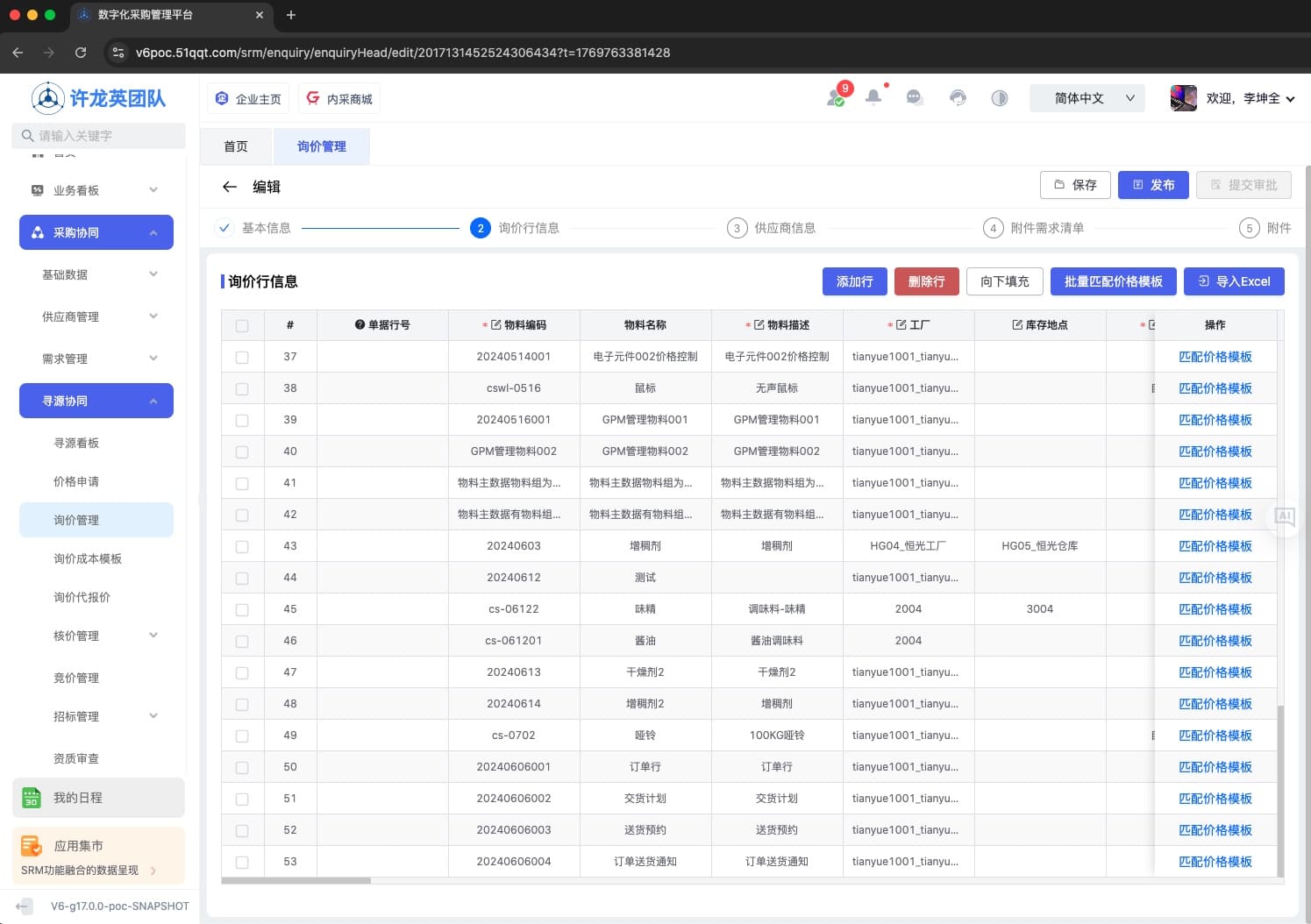
当布局模板 pattern 配置为 平铺格式 tab 时,如果行内容过多滚动时表头会跟随滚动,不方便查看,通过动态设置 vxeGrid 高度 height 值实现冻结表头效果
vue
<script setup lang="ts">
import { ref, reactive, onBeforeMount } from "vue";

// 配置
const options = reactive<Partial<GlobalPageLayoutTypes.EditPageLayoutProps>>({
  localConfig: {
    groups: [
      {
        groupName: "询价行信息",
        groupNameI18nKey: "i18n_title_RFQLineInformation",
        groupCode: "purchaseEnquiryItemList",
        groupType: "item",
        sortOrder: "2",
        extend: {
          // 注: vxeGrid 属性须配置在 vxeGridConfig 中
          vxeGridConfig: {
            height: 500,
          },
        },
      },
    ],
  },
});

onBeforeMount(() => {
  // 动态获取屏幕高度
  const clientHeight = document.documentElement.clientHeight;
  const maxHeight = clientHeight - 314;

  options.localConfig?.groups?.forEach((group) => {
    if (group.groupCode === "purchaseEnquiryItemList") {
      if (group.extend?.vxeGridConfig) {
        group.extend.vxeGridConfig.height = maxHeight;
      }
    }
  });
});
</script>示例
事件监听
TIP
编辑、详情模板 vxeGrid 表格事件监听,可根据 groupCode 区分各表行,其他参数可参考vxe 官方文档
vue
<template>
  <div class="edit-page">
    <q-edit-page-layout
      ref="layoutRef"
      v-bind="options"
      @itemListAdd="handleItemListAdd"
      @supplierAdd="handleSupplierAdd"
      @customPublish="handleCustomPublish"
      @back="back"
      @pageBack="handlePageBack"
      @vxe_keydown="handleVxeKeydown"
      @vxe_headerCellClick="handleVxeHeaderCellClick"
      @vxe_headerCellDblclick="handleVxeHeaderCellDblclick"
      @vxe_headerCellMenu="handleVxeHeaderCellMenu"
      @vxe_cellClick="handleVxeCellClick"
      @vxe_cellDblclick="handleVxeCellDblclick"
      @vxe_cellMenu="handleVxeCellMenu"
      @vxe_footerCellClick="handleVxeFooterCellClick"
      @vxe_footerCellDblclick="handleVxeFooterCellDblclick"
      @vxe_footerCellMenu="handleVxeFooterCellMenu"
      @vxe_radioChange="handleVxeRadioChange"
      @vxe_checkboxChange="handleVxeCheckboxChange"
      @vxe_checkboxAll="handleVxeCheckboxAll"
      @vxe_scroll="handleVxeScroll"
      @vxe_zoom="handleVxeZoom"
      @vxe_custom="handleVxeCustom"
      @vxe_cell_area_cut="handleGridCellAreaCut"
      @vxe_cell_area_copy="handleGridCellAreaCopy"
      @vxe_cell_area_paste="handleGridCellAreaPaste"
    ></q-edit-page-layout>
  </div>
</template>

<script setup lang="ts">
// vxe表格事件 start
// 当表格被激活且键盘被按下时会触发的事件
const handleVxeKeydown = (params: GlobalPageLayoutTypes.KeydownEventParams) => {
  console.log("vxe_keydown", params);
};
// 表头单元格被点击时会触发该事件
const handleVxeHeaderCellClick = (
  params: GlobalPageLayoutTypes.HeaderCellClickEventParams
) => {
  console.log("vxe_headerCellClick", params);
};
// 表头单元格被双击时会触发该事件
const handleVxeHeaderCellDblclick = (
  params: GlobalPageLayoutTypes.HeaderCellDblclickEventParams
) => {
  console.log("vxe_headerCellDblclick", params);
};
// 只对 menu-config 配置时有效,表头单元格被鼠标右键时触发该事件
const handleVxeHeaderCellMenu = (
  params: GlobalPageLayoutTypes.HeaderCellMenuEventParams
) => {
  console.log("vxe_headerCellMenu", params);
};
// 单元格被点击时会触发该事件
const handleVxeCellClick = (
  params: GlobalPageLayoutTypes.CellClickEventParams
) => {
  console.log("vxe_cellClick", params);
};
// 单元格被双击时会触发该事件
const handleVxeCellDblclick = (
  params: GlobalPageLayoutTypes.CellDblclickEventParams
) => {
  console.log("vxe_cellDblclick", params);
};
// 只对 menu-config 配置时有效,单元格被鼠标右键时触发该事件
const handleVxeCellMenu = (
  params: GlobalPageLayoutTypes.CellMenuEventParams
) => {
  console.log("vxe_cellMenu", params);
};
// 表尾单元格被点击时会触发该事件
const handleVxeFooterCellClick = (
  params: GlobalPageLayoutTypes.FooterCellClickEventParams
) => {
  console.log("vxe_footerCellClick", params);
};
// 表尾单元格被双击时会触发该事件
const handleVxeFooterCellDblclick = (
  params: GlobalPageLayoutTypes.FooterCellDblclickEventParams
) => {
  console.log("vxe_footerCellDblclick", params);
};
// 只对 menu-config 配置时有效,表尾单元格被鼠标右键时触发该事件
const handleVxeFooterCellMenu = (
  params: GlobalPageLayoutTypes.FooterCellMenuEventParams
) => {
  console.log("vxe_footerCellMenu", params);
};
// 只对 type=radio 有效,当手动勾选并且值发生改变时触发的事件
const handleVxeRadioChange = (
  params: GlobalPageLayoutTypes.RadioChangeEventParams
) => {
  console.log("vxe_radioChange", params);
};
// 只对 type=checkbox 有效,当手动勾选并且值发生改变时触发的事件
const handleVxeCheckboxChange = (
  params: GlobalPageLayoutTypes.CheckboxChangeEventParams
) => {
  console.log("vxe_checkboxChange", params);
};
// 只对 type=checkbox 有效,当手动勾选全选时触发的事件
const handleVxeCheckboxAll = (
  params: GlobalPageLayoutTypes.CheckboxAllEventParams
) => {
  console.log("vxe_checkboxAll", params);
};
// 表格滚动时会触发该事件
const handleVxeScroll = (params: GlobalPageLayoutTypes.ScrollEventParams) => {
  console.log("vxe_scroll", params);
};
// 当最大化或还原操作被手动点击时会后触发该事件
const handleVxeZoom = (params: GlobalPageLayoutTypes.ZoomEventParams) => {
  console.log("vxe_zoom", params);
};
// 如果与工具栏关联,在自定义列按钮被手动点击后会触发该事件
const handleVxeCustom = (params: GlobalPageLayoutTypes.CustomEventParams) => {
  console.log("vxe_custom", params);
};
// 只对 keyboard-config.isClip 配置时有效,在单元格被剪贴时会触发该事件
const handleGridCellAreaCut = (
  params: GlobalPageLayoutTypes.CellAreaCutParams
) => {
  console.log("cut params :>> ", params);
};
// 只对 keyboard-config.isClip 配置时有效,在单元格被复制时会触发该事件
const handleGridCellAreaCopy = (
  params: GlobalPageLayoutTypes.CellAreaCopyParams
) => {
  console.log("copy params :>> ", params);
};
// 只对 keyboard-config.isClip 配置时有效,在单元格被粘贴时会触发该事件
const handleGridCellAreaPaste = (
  params: GlobalPageLayoutTypes.CellAreaPasteParams
) => {
  console.log("paste params :>> ", params);
};
// vxe表格事件 end
</script>vue
<template>
  <div class="detail-page">
    <q-detail-page-layout
      ref="layoutRef"
      v-bind="options"
      @itemListAdd="handleItemListAdd"
      @supplierAdd="handleSupplierAdd"
      @customPublish="handleCustomPublish"
      @back="back"
      @pageBack="handlePageBack"
      @vxe_keydown="handleVxeKeydown"
      @vxe_headerCellClick="handleVxeHeaderCellClick"
      @vxe_headerCellDblclick="handleVxeHeaderCellDblclick"
      @vxe_headerCellMenu="handleVxeHeaderCellMenu"
      @vxe_cellClick="handleVxeCellClick"
      @vxe_cellDblclick="handleVxeCellDblclick"
      @vxe_cellMenu="handleVxeCellMenu"
      @vxe_footerCellClick="handleVxeFooterCellClick"
      @vxe_footerCellDblclick="handleVxeFooterCellDblclick"
      @vxe_footerCellMenu="handleVxeFooterCellMenu"
      @vxe_radioChange="handleVxeRadioChange"
      @vxe_checkboxChange="handleVxeCheckboxChange"
      @vxe_checkboxAll="handleVxeCheckboxAll"
      @vxe_scroll="handleVxeScroll"
      @vxe_zoom="handleVxeZoom"
      @vxe_custom="handleVxeCustom"
    ></q-detail-page-layout>
  </div>
</template>

<script setup lang="ts">
// vxe表格事件 start
// 当表格被激活且键盘被按下时会触发的事件
const handleVxeKeydown = (params: GlobalPageLayoutTypes.KeydownEventParams) => {
  console.log("vxe_keydown", params);
};
// 表头单元格被点击时会触发该事件
const handleVxeHeaderCellClick = (
  params: GlobalPageLayoutTypes.HeaderCellClickEventParams
) => {
  console.log("vxe_headerCellClick", params);
};
// 表头单元格被双击时会触发该事件
const handleVxeHeaderCellDblclick = (
  params: GlobalPageLayoutTypes.HeaderCellDblclickEventParams
) => {
  console.log("vxe_headerCellDblclick", params);
};
// 只对 menu-config 配置时有效,表头单元格被鼠标右键时触发该事件
const handleVxeHeaderCellMenu = (
  params: GlobalPageLayoutTypes.HeaderCellMenuEventParams
) => {
  console.log("vxe_headerCellMenu", params);
};
// 单元格被点击时会触发该事件
const handleVxeCellClick = (
  params: GlobalPageLayoutTypes.CellClickEventParams
) => {
  console.log("vxe_cellClick", params);
};
// 单元格被双击时会触发该事件
const handleVxeCellDblclick = (
  params: GlobalPageLayoutTypes.CellDblclickEventParams
) => {
  console.log("vxe_cellDblclick", params);
};
// 只对 menu-config 配置时有效,单元格被鼠标右键时触发该事件
const handleVxeCellMenu = (
  params: GlobalPageLayoutTypes.CellMenuEventParams
) => {
  console.log("vxe_cellMenu", params);
};
// 表尾单元格被点击时会触发该事件
const handleVxeFooterCellClick = (
  params: GlobalPageLayoutTypes.FooterCellClickEventParams
) => {
  console.log("vxe_footerCellClick", params);
};
// 表尾单元格被双击时会触发该事件
const handleVxeFooterCellDblclick = (
  params: GlobalPageLayoutTypes.FooterCellDblclickEventParams
) => {
  console.log("vxe_footerCellDblclick", params);
};
// 只对 menu-config 配置时有效,表尾单元格被鼠标右键时触发该事件
const handleVxeFooterCellMenu = (
  params: GlobalPageLayoutTypes.FooterCellMenuEventParams
) => {
  console.log("vxe_footerCellMenu", params);
};
// 只对 type=radio 有效,当手动勾选并且值发生改变时触发的事件
const handleVxeRadioChange = (
  params: GlobalPageLayoutTypes.RadioChangeEventParams
) => {
  console.log("vxe_radioChange", params);
};
// 只对 type=checkbox 有效,当手动勾选并且值发生改变时触发的事件
const handleVxeCheckboxChange = (
  params: GlobalPageLayoutTypes.CheckboxChangeEventParams
) => {
  console.log("vxe_checkboxChange", params);
};
// 只对 type=checkbox 有效,当手动勾选全选时触发的事件
const handleVxeCheckboxAll = (
  params: GlobalPageLayoutTypes.CheckboxAllEventParams
) => {
  console.log("vxe_checkboxAll", params);
};
// 表格滚动时会触发该事件
const handleVxeScroll = (params: GlobalPageLayoutTypes.ScrollEventParams) => {
  console.log("vxe_scroll", params);
};
// 当最大化或还原操作被手动点击时会后触发该事件
const handleVxeZoom = (params: GlobalPageLayoutTypes.ZoomEventParams) => {
  console.log("vxe_zoom", params);
};
// 如果与工具栏关联,在自定义列按钮被手动点击后会触发该事件
const handleVxeCustom = (params: GlobalPageLayoutTypes.CustomEventParams) => {
  console.log("vxe_custom", params);
};
// vxe表格事件 end
</script>表行编辑规则
WARNING
注意, vxeGrid 表格组件原 activeMethod 方法已弃用, 使用 beforeEditMethod api 方法替换
vue
<script setup lang="ts">
// 配置
const options = reactive<Partial<GlobalPageLayoutTypes.EditPageLayoutProps>>({
  localConfig: {
    groups: [
      {
        groupName: "分包信息",
        groupCode: "purchaseBiddingHeadList",
        groupType: "item",
        sortOrder: "2",
        extend: {
          // 注: vxe-table 相关属性须配置在 vxeGridConfig 中
          vxeGridConfig: {
            editConfig: {
              trigger: "click", // 点击触发编辑
              mode: "row", // 行编辑模式
              /**
               * @description: 表行编辑规则
               * @param {Object} pageData 页面所有数据, ref响应对象,注意在使用时须带上.value
               * @param {Object} row 表行数据
               * @param {number} rowIndex 表行索引值
               * @param {Object} column 列配置
               * @param {number} columnIndex 列索引
               * @return {boolean} 返回布尔值, 为 true 时允许编辑
               */
              beforeEditMethod(
                pageData,
                { row, rowIndex, column, columnIndex }
              ) {
                console.log("row :>> ", row);
                console.log("rowIndex :>> ", rowIndex);
                console.log("column :>> ", column);
                console.log("columnIndex :>> ", columnIndex);
                console.log("pageData :>> ", pageData.value);
                if (
                  pageData.value.mustMaterialNumber === "0" ||
                  columnIndex === 2
                ) {
                  return false;
                }
                return true;
              },
            },
          },
        },
      },
    ],
  },
});
</script>js
function getPageConfig ( Vue ) {
  return {
    ditLayout: 'tab',
    tempRole: 'purchase',
    examineLayout: 'tab',
    groups: [
        {
          groupName: '分包信息',
          groupNameI18nKey: 'i18n_field_zsVH_268adaad',
          groupCode: 'purchaseBiddingHeadList',
          groupType: 'item',
          sortOrder: '2',
        },
        {
          groupName: '分包明细',
          groupNameI18nKey: 'i18n_field_zsRH_268da877',
          groupCode: 'purchaseBiddingItemList',
          groupType: 'item',
          sortOrder: '3',
          extend: {
            vxeGridConfig: {
              editConfig: {
                trigger: 'dblclick', // 双击触发编辑
                mode: 'cell', // 单元格编辑模式
                /**
                 * @description: 表行编辑规则
                 * @param {Object} pageData 页面所有数据, ref响应对象,注意在使用时须带上.value
                 * @param {Object} row 表行数据
                 * @param {number} rowIndex 表行索引值
                 * @param {Object} column 列配置
                 * @param {number} columnIndex 列索引
                 * @return {boolean} 返回布尔值, 为 true 时允许编辑
                 */
                beforeEditMethod(pageData, { row, rowIndex, column, columnIndex }) {
                  console.log('row :>> ', row)
                  console.log('rowIndex :>> ', rowIndex)
                  console.log('column :>> ', column)
                  console.log('columnIndex :>> ', columnIndex)
                  console.log('pageData :>> ', pageData.value)
                  if (pageData.value.test === '1' || columnIndex === 3) {
                    return false
                  }
                  return true
                },
              },
            }
          }
        },
    ],
    formFields: [],
    itemColumns: [],
}单元格动态样式配置
🙌 🌰 采购协同 > 寻源协同 > 物料主数据
vue
<template>
  <div class="detail-page">
    <q-detail-page-layout
      ref="layoutRef"
      v-bind="options"
    ></q-detail-page-layout>
  </div>
</template>

<script setup lang="ts">
import type {
  VxeColumnSlotTypes,
  VxeTableDataRow,
  VxeTablePropTypes,
} from "vxe-table";

// 表头动态样式配置
const headerCellStyle: VxeTablePropTypes.HeaderCellStyle<VxeTableDataRow> = ({
  column,
}) => {
  if (column.field === "requireDate") {
    return {
      backgroundColor: "#f60",
      color: "#ffffff",
    };
  }
};

// 行动态样式配置
const rowStyle: VxeTablePropTypes.RowStyle<VxeTableDataRow> = ({
  rowIndex,
}) => {
  if ([2, 3, 5].includes(rowIndex)) {
    return {
      backgroundColor: "red",
      color: "#ffffff",
    };
  }
};

// 单元格动态样式配置
const cellStyle: VxeTablePropTypes.CellStyle<VxeTableDataRow> = ({
  row,
  column,
}) => {
  if (column.field === "requireQuantity") {
    if (row.requireQuantity >= 300) {
      return {
        backgroundColor: "#187",
      };
    } else {
      return {
        backgroundColor: "#2db7f5",
      };
    }
  }
};

// 配置
const options = reactive<Partial<GlobalPageLayoutTypes.EditPageLayoutProps>>({
  // 本地页面数据配置
  localConfig: {
    groups: [
      {
        groupName: "竞价行信息",
        groupNameI18nKey: "i18n_title_ebiddingBankInfo",
        groupCode: "purchaseEbiddingItemList",
        groupType: "item",
        sortOrder: "2",
        extend: {
          vxeGridConfig: {
            headerCellStyle,
            rowStyle,
            cellStyle,
          },
        },
      },
    ],
  },
});
</script>表行分组 prefix 列配置
TIP
分组配置属性 setPrefixColumn 默认值为 true, 拼接 prefix (checkbox + 索引)列配置;属性 prefixColumnType 默认值为 checkbox, 可配置单选框 radio 。
vue
<script setup lang="ts">
import { ref, reactive } from "vue";
// 配置
const options = reactive<Partial<GlobalPageLayoutTypes.EditPageLayoutProps>>({
  localConfig: {
    groups: [
      {
        groupName: "竞价行信息",
        groupNameI18nKey: "i18n_title_ebiddingBankInfo",
        groupCode: "purchaseEbiddingItemList",
        groupType: "item",
        sortOrder: "2",
        setPrefixColumn: true, // 默认为 true
        prefixColumnType: "radio", // 默认为 'checkbox'
      },
    ],
  },
});
</script>获取模板各分组表头 ref 实例、表行 ref 实例
TIP
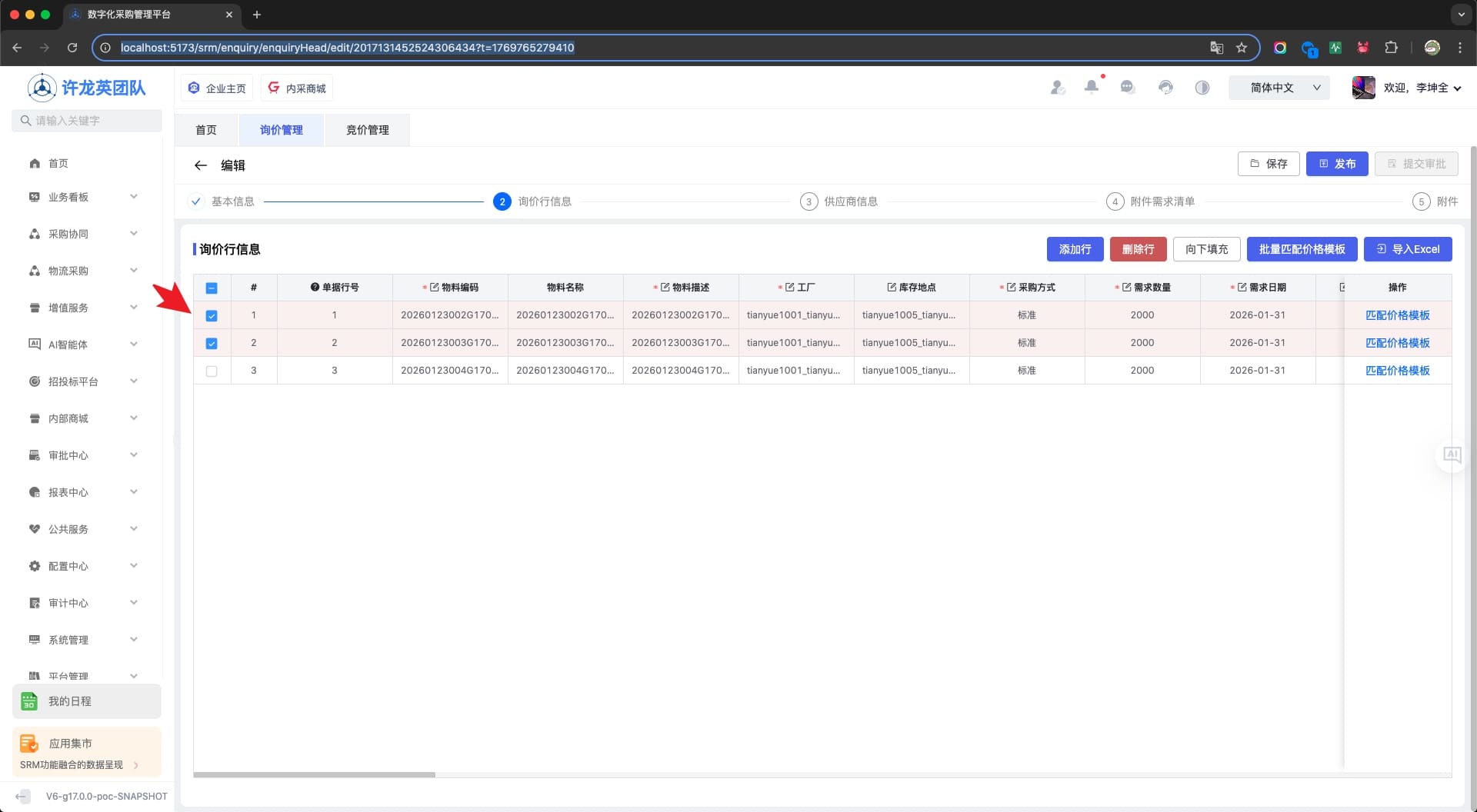
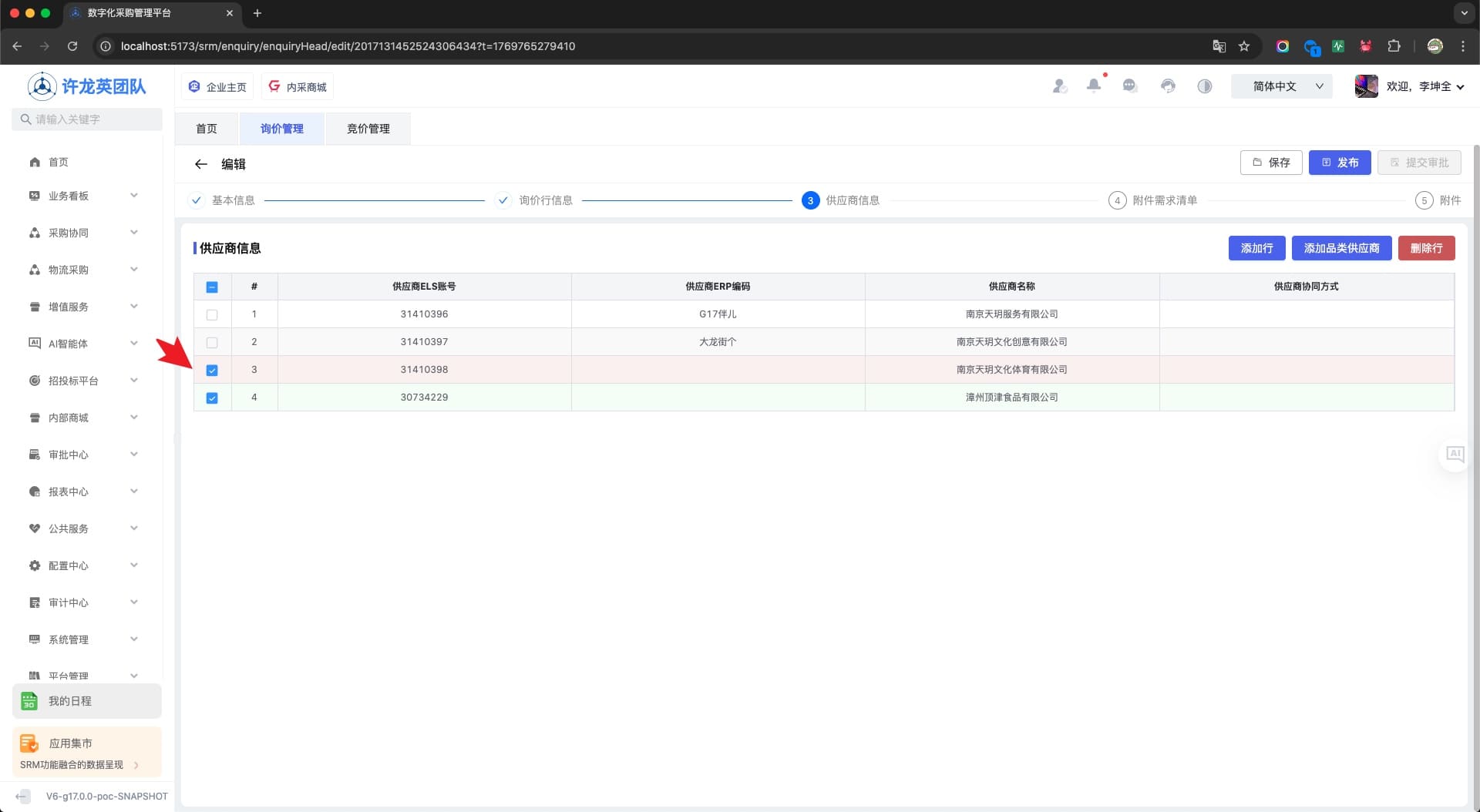
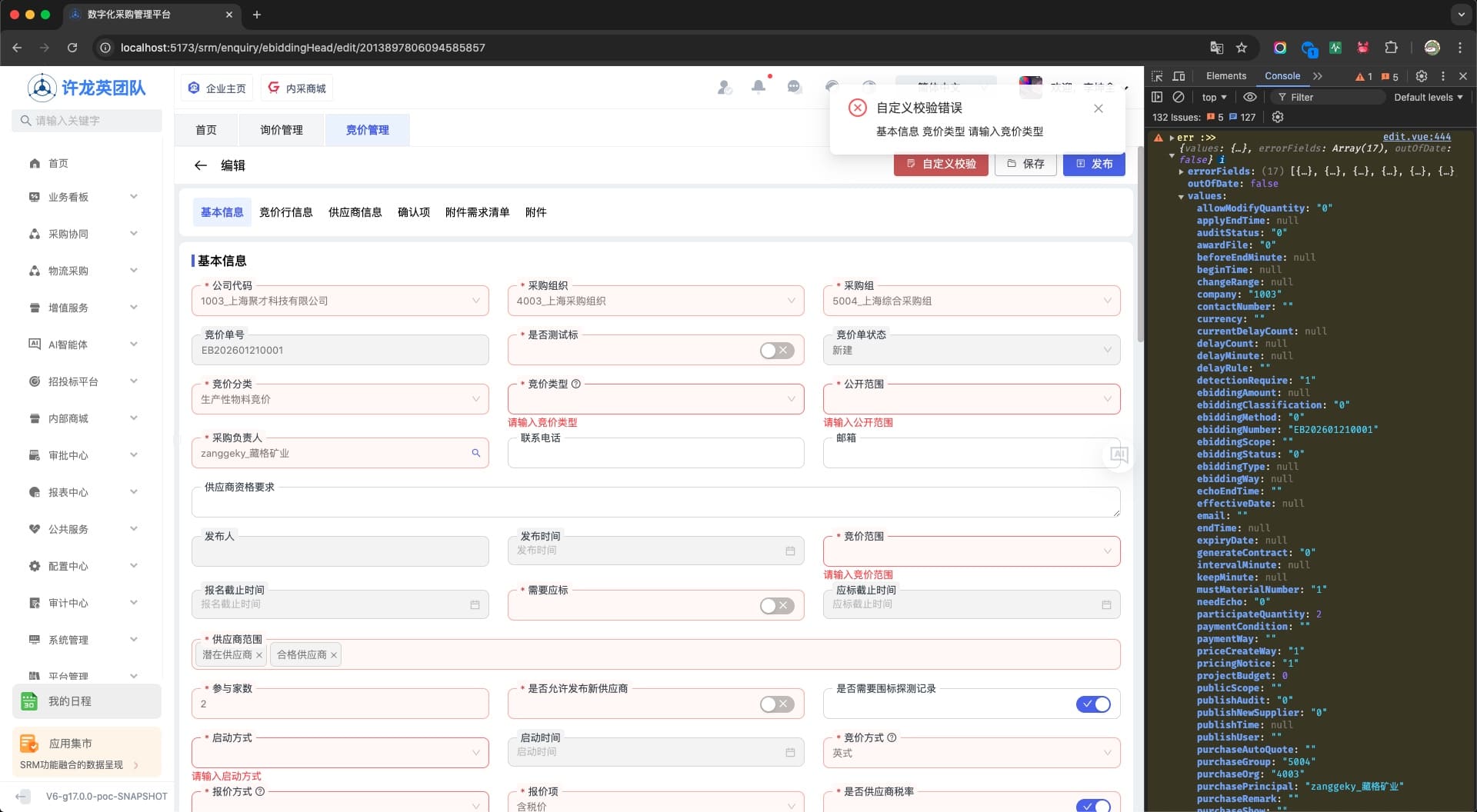
通过监听模板instance或vxe_instance事件,以分组 groupCode 作为判断条件,可以获取 AForm 表单或 VxeGrid 表格 ref 实例,配合模板 handleAfterDetailApiResponse,实现初始化时默认勾选某个分组行数据的需求;或在自定义按钮事件中,实现单独校验表头必填数据的需求;等等...
vue
<template>
  <div class="edit-page">
    <q-edit-page-layout
      ref="layoutRef"
      v-bind="options"
      @instance="handleInstance"
      @vxe_instance="handleGridInstance"
    ></q-edit-page-layout>
</template>

<script setup lang="ts">
import { ref, reactive, nextTick } from 'vue'

// ui组件库 types
import type { GlobalPageLayoutTypes } from '@qqt-product/ui'
import type { VxeGridInstance } from 'vxe-table'
import type { FormInstance } from 'ant-design-vue'

const baseFormRef = ref<FormInstance>()
const purchaseEnquiryItemListGridRef = ref<VxeGridInstance>()
const enquirySupplierListListGridRef = ref<VxeGridInstance>()


// 获取 form表单 ref实例
const handleInstance = (params: GlobalPageLayoutTypes.InstanceParams) => {
  console.log('instance params :>> ', params)
  const { groupCode, formRef } = params
  if (groupCode === 'baseForm') {
    baseFormRef.value = formRef
  }
}

// 获取 vxeGrid表格 ref实例
const handleGridInstance = (params: GlobalPageLayoutTypes.VxeInstanceParams) => {
  console.log('vxeInstance params :>> ', params)
  const { groupCode, $grid } = params
  // 询价行信息
  if (groupCode === 'purchaseEnquiryItemList') {
    purchaseEnquiryItemListGridRef.value = $grid
  }
  // 供应商信息
  if (groupCode === 'enquirySupplierListList') {
    enquirySupplierListListGridRef.value = $grid
  }
}

const handleAfterDetailApiResponse = ({ pageData }: GlobalPageLayoutTypes.Expose) => {
  // 新建时不处理
  if (!pageData.id) {
    return
  }

  nextTick(() => {
    console.log('purchaseEnquiryItemListGridRef :>> ', purchaseEnquiryItemListGridRef.value)
    // 默认勾选 询价行信息表行 第一、二行数据
    if (purchaseEnquiryItemListGridRef.value) {
      const { fullData } = purchaseEnquiryItemListGridRef.value.getTableData()
      if (fullData && fullData.length >= 2) {
        purchaseEnquiryItemListGridRef.value.setCheckboxRow([fullData[0], fullData[1]], true)
      }
    }

    // 默认勾选 供应商信息表行 第三、四行数据
    if (enquirySupplierListListGridRef.value) {
      const { fullData } = enquirySupplierListListGridRef.value.getTableData()

      if (fullData && fullData.length >= 4) {
        enquirySupplierListListGridRef.value.setCheckboxRow([fullData[2], fullData[3]], true)
      }
    }
  })
}

// 配置
const options = reactive<Partial<GlobalPageLayoutTypes.EditPageLayoutProps>>({
  // ...
  handleAfterDetailApiResponse,
})
</script>vue
<template>
  <div class="edit-page">
    <q-edit-page-layout
      ref="layoutRef"
      v-bind="options"
      @instance="handleInstance"
      @customValidate="handleCustomValidate"
    >
    </q-edit-page-layout>
  </div>
</template>

<script setup lang="ts">
import { ref, reactive } from "vue";
import type { FormInstance } from "ant-design-vue";
import {
  notification as Notification,
  message as Message,
} from "ant-design-vue";

const baseFormRef = ref<FormInstance>();

// 配置
const options = reactive<Partial<GlobalPageLayoutTypes.EditPageLayoutProps>>({
  // ...
  pageButtons: [
    {
      ...BUTTON_CUSTOM_DANGER,
      title: "自定义校验",
      emit: true,
      emitKey: "customValidate",
    },
  ],
  // ...
});

// 获取 form表单 ref实例
const handleInstance = (params: GlobalPageLayoutTypes.InstanceParams) => {
  console.log("instance params :>> ", params);
  const { groupCode, formRef } = params;
  if (groupCode === "baseForm") {
    baseFormRef.value = formRef;
  }
};

// 调用表单实例ref校验
const handleCustomValidate = () => {
  const $formRef = baseFormRef.value;
  if ($formRef) {
    $formRef
      .validateFields()
      .then(() => {
        console.log("success :>> ");
      })
      .catch((err) => {
        console.warn("err :>> ", err);

        const errorFields =
          err.errorFields && err.errorFields.length ? err.errorFields[0] : [];
        const nameStr =
          errorFields.name && errorFields.name.length
            ? errorFields.name[0]
            : "";
        const errorsStr =
          errorFields.errors && errorFields.errors.length
            ? errorFields.errors[0]
            : "";

        // 表单校验错误提示
        if (nameStr && errorsStr) {
          const groups = layoutConfig.value.groups;
          const baseFormGroup = groups.find((n) => n.groupCode === "baseForm");
          if (baseFormGroup) {
            const { fieldLabel } = baseFormGroup?.formFields?.find(
              (n) => n.fieldName === nameStr
            ) || { fieldLabel: "" };
            const description = [
              baseFormGroup.groupName,
              fieldLabel,
              errorsStr,
            ];

            Notification.error({
              message: "自定义校验错误",
              description: description.join(" "),
            });
          }
        }
      });
  }
};
</script>示例