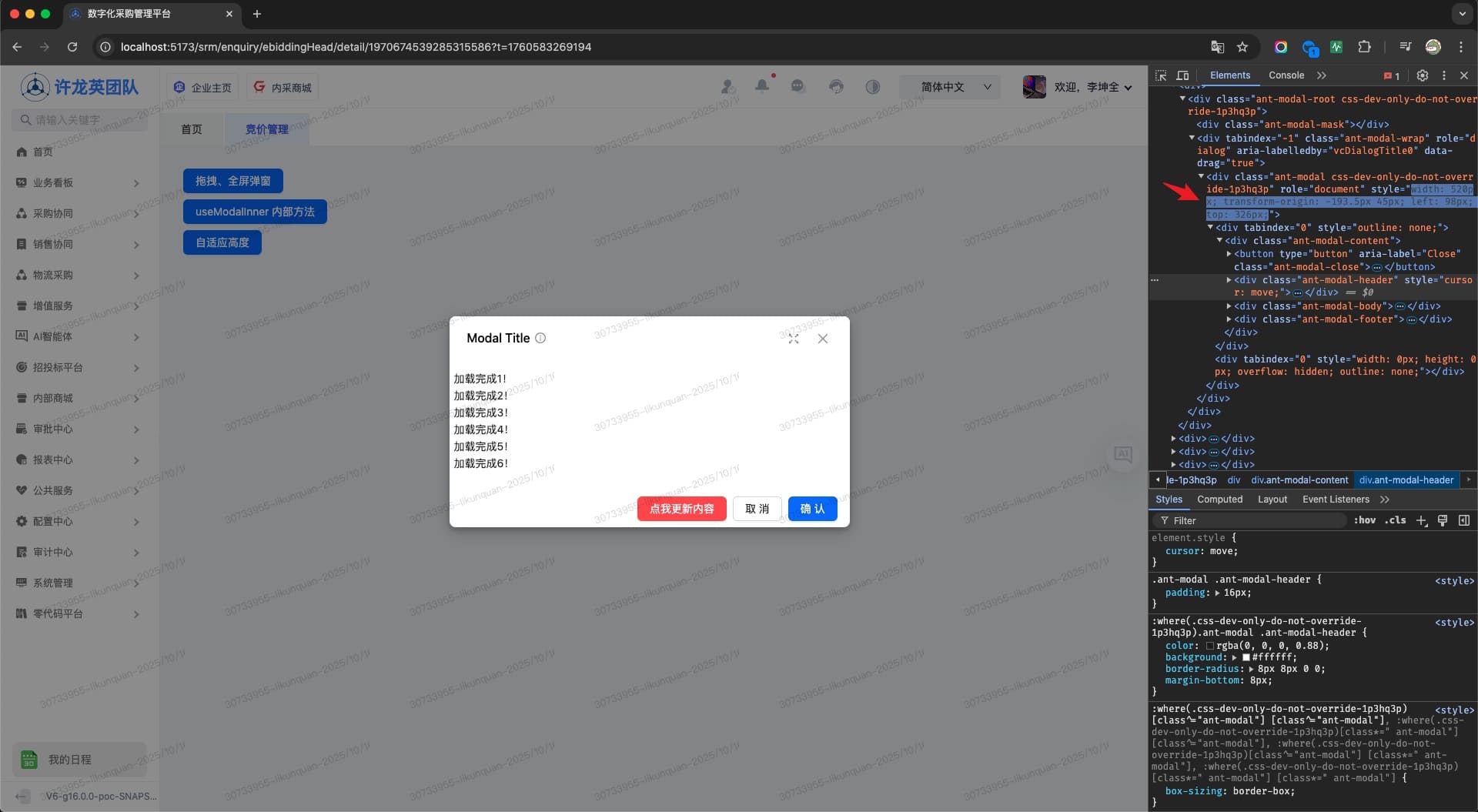
Appearance
可拖拽、全屏弹窗
TIP
使用QBasicModal组件包裹原业务逻辑实现默认可拖拽、带全屏等功能弹窗。从 ui 库中解构useModal方法操作弹窗实例;解构useModalInner 方法设置 modal 参数,如修改标题、关闭弹窗等。
使用示例(ref 组件实例)
vue
<template>
  <div style="padding: 30px">
    <a-space direction="vertical">
      <a-button type="primary" @click="openModalLoading"
        >拖拽、全屏弹窗</a-button
      >
      <a-button type="primary" @click="() => openModal2()"
        >useModalInner 内部方法</a-button
      >
      <a-button type="primary" @click="() => openModal3()">自适应高度</a-button>
    </a-space>

    <Modal1 @register="register1" :minHeight="100" />
    <Modal2 @register="register2" />
    <Modal3 @register="register3" />
  </div>
</template>

<script setup lang="ts">
import Modal1 from "./components/Modal1.vue";
import Modal2 from "./components/Modal2.vue";
import Modal3 from "./components/Modal3.vue";

import { useModal } from "@qqt-product/ui";

const [register1, { openModal: openModal1 }] = useModal();
const [register2, { openModal: openModal2 }] = useModal();
const [register3, { openModal: openModal3 }] = useModal();

function openModalLoading() {
  openModal1(true);
}
</script>vue
<template>
  <q-basic-modal
    v-bind="$attrs"
    destroyOnClose
    @register="register"
    title="Modal Title"
    helpMessage="提示"
    @visible-change="handleShow"
  >
    <template #insertFooter>
      <a-button type="primary" danger @click="setLines" :disabled="loading"
        >点我更新内容</a-button
      >
    </template>
    <template v-if="loading">
      <div class="empty-tips">加载中,稍等3秒……</div>
    </template>
    <template v-if="!loading">
      <ul>
        <li v-for="index in lines" :key="index">加载完成{{ index }}!</li>
      </ul>
    </template>
  </q-basic-modal>
</template>

<script lang="ts" setup>
import { ref, watch } from "vue";
import { useModalInner } from "@qqt-product/ui";

const loading = ref(true);
const lines = ref(10);
const [register, { setModalProps, redoModalHeight }] = useModalInner();

watch(
  () => lines.value,
  () => {
    redoModalHeight();
  }
);

function handleShow(visible: boolean) {
  if (visible) {
    loading.value = true;
    setModalProps({ loading: true, confirmLoading: true });
    setTimeout(() => {
      lines.value = Math.round(Math.random() * 30 + 5);
      loading.value = false;
      setModalProps({ loading: false, confirmLoading: false });
    }, 3000);
  }
}

function setLines() {
  lines.value = Math.round(Math.random() * 20 + 10);
}
</script>
<style scoped>
.empty-tips {
  height: 100px;
  line-height: 100px;
  text-align: center;
}
</style>vue
<template>
  <q-basic-modal
    @register="register"
    title="Modal Title"
    :helpMessage="['提示1', '提示2']"
    :okButtonProps="{ disabled: true }"
  >
    <a-button type="primary" @click="closeModal" class="mr-2">
      从内部关闭弹窗
    </a-button>
    <a-button
      type="primary"
      @click="setModalPropsInner"
      style="margin-left: 10px"
    >
      从内部修改title
    </a-button>
  </q-basic-modal>
</template>

<script lang="ts" setup>
import { useModalInner } from "@qqt-product/ui";

const [register, { closeModal, setModalProps }] = useModalInner();

function setModalPropsInner() {
  setModalProps({ title: "Modal New Title" });
}
</script>vue
<template>
  <q-basic-modal
    v-bind="$attrs"
    title="Modal Title"
    :helpMessage="['提示1', '提示2']"
    width="700px"
  >
    <p class="h-20" v-for="index in 20" :key="index">根据屏幕高度自适应</p>
  </q-basic-modal>
</template>简单使用(替换 AModal 弹窗)
TIP
简单使用时,直接使用QBasicModal替换原AModal弹窗组件, 绑定布尔值开关变量。其余配置参考 AModal 文档。
vue
<template>
  <div class="modal">
    <q-basic-modal v-model:open="visible"></q-basic-modal>
    <!-- 或者 -->
    <q-basic-modal v-model:visible="visible"></q-basic-modal>
  </div>
</template>

<script lang="ts" setup>
const visible = ref<boolean>(false);
</script>示例